Parts · v0.7.0
dev-dashboard
/dev/dashboard, an in-process LiveDashboard: live charts (memory, CPU, req/s, p50/p95/p99, errors, DB pool, Tokio), requests per route, traces as waterfalls, SQL fingerprints with N+1 and EXPLAIN, a live log tail, insights, a routes explorer, an interactive schema diagram (ERD) with a migrations timeline and drift checks, an optional bring-your-own-key AI assistant, test runs and CI, a load lab, Upstreams (the APIs the app calls through its outbound wrapper, with a dependency map), Security (attack and abuse detectors with an attack simulator) and Frontend (rage and dead clicks, JS errors and Web Vitals from a browser beacon). Development only; a read-only subset for admins in production.
- Add it
cargo offrails add dev-dashboard- Requires
- nothing
- Crates
sysinfo --no-default-features --features system,quick-xml,reqwest --no-default-features --features rustls,json,http2,tower --features util,flate2,pprof --no-default-features --target cfg(unix),backtrace --target cfg(unix)- Files
118 files at app paths, 44 wiring lines
.config/nextest.tomlmigration/src/m20261016_000600_create_lab_orders.rssrc/kernel/dashboard/access.rssrc/kernel/dashboard/accounts.rssrc/kernel/dashboard/ai.rssrc/kernel/dashboard/ai_agent.rssrc/kernel/dashboard/ai_context.rssrc/kernel/dashboard/ai_explain.rssrc/kernel/dashboard/ai_home.rssrc/kernel/dashboard/ai_realtime.rssrc/kernel/dashboard/ai_tools.rssrc/kernel/dashboard/ai_watch.rssrc/kernel/dashboard/ai_web.rssrc/kernel/dashboard/charts.rssrc/kernel/dashboard/cli.rssrc/kernel/dashboard/collector.rssrc/kernel/dashboard/demo.rssrc/kernel/dashboard/erd.rssrc/kernel/dashboard/github.rssrc/kernel/dashboard/hist.rssrc/kernel/dashboard/history.rssrc/kernel/dashboard/http.rssrc/kernel/dashboard/insights.rssrc/kernel/dashboard/lab.rssrc/kernel/dashboard/methods.rssrc/kernel/dashboard/migrations.rssrc/kernel/dashboard/mod.rssrc/kernel/dashboard/panels.rssrc/kernel/dashboard/profiler.rssrc/kernel/dashboard/route_explorer.rssrc/kernel/dashboard/rum.rssrc/kernel/dashboard/schema.rssrc/kernel/dashboard/series.rssrc/kernel/dashboard/sql.rssrc/kernel/dashboard/testruns.rssrc/kernel/dashboard/threats.rssrc/kernel/dashboard/trace.rssrc/kernel/dashboard/traces_web.rssrc/kernel/dashboard/upstreams.rssrc/kernel/dashboard/waterfall.rssrc/kernel/dashboard/web.rssrc/kernel/outbound.rsstatic/dashboard-rum.jsstatic/kernel/dashboard-ai.cssstatic/kernel/dashboard-ai.jsstatic/kernel/dashboard-erd.jsstatic/kernel/dashboard-trace.cssstatic/kernel/dashboard-trace.jsstatic/kernel/dashboard.cssstatic/kernel/dashboard.jsstatic/kernel/lab-ux.jsstatic/kernel/lab-widget.jstemplates/kernel/dashboard/_ai_bar.htmltemplates/kernel/dashboard/_ai_block.htmltemplates/kernel/dashboard/_ai_chart.htmltemplates/kernel/dashboard/_ai_inline.htmltemplates/kernel/dashboard/_ai_panel.htmltemplates/kernel/dashboard/_ai_run.htmltemplates/kernel/dashboard/_ai_run_end.htmltemplates/kernel/dashboard/_ai_setup.htmltemplates/kernel/dashboard/_ai_step.htmltemplates/kernel/dashboard/_cards.htmltemplates/kernel/dashboard/_chart.htmltemplates/kernel/dashboard/_charts.htmltemplates/kernel/dashboard/_command.htmltemplates/kernel/dashboard/_heatmap.htmltemplates/kernel/dashboard/_icicle.htmltemplates/kernel/dashboard/_incidents.htmltemplates/kernel/dashboard/_incidents_box.htmltemplates/kernel/dashboard/_incidents_panel.htmltemplates/kernel/dashboard/_lab_status.htmltemplates/kernel/dashboard/_layout.htmltemplates/kernel/dashboard/_log_row.htmltemplates/kernel/dashboard/_memory.htmltemplates/kernel/dashboard/_requests.htmltemplates/kernel/dashboard/_test_progress.htmltemplates/kernel/dashboard/_traces.htmltemplates/kernel/dashboard/_waterfall.htmltemplates/kernel/dashboard/_waterfall_fragment.htmltemplates/kernel/dashboard/ai.htmltemplates/kernel/dashboard/ai_history.htmltemplates/kernel/dashboard/ai_run.htmltemplates/kernel/dashboard/charts.htmltemplates/kernel/dashboard/config.htmltemplates/kernel/dashboard/explain.htmltemplates/kernel/dashboard/frontend.htmltemplates/kernel/dashboard/github.htmltemplates/kernel/dashboard/insights.htmltemplates/kernel/dashboard/lab.htmltemplates/kernel/dashboard/lab_checkout.htmltemplates/kernel/dashboard/lab_orders.htmltemplates/kernel/dashboard/lab_ux.htmltemplates/kernel/dashboard/lab_ux_widget.htmltemplates/kernel/dashboard/logs.htmltemplates/kernel/dashboard/methods.htmltemplates/kernel/dashboard/migrations.htmltemplates/kernel/dashboard/overview.htmltemplates/kernel/dashboard/profile.htmltemplates/kernel/dashboard/requests.htmltemplates/kernel/dashboard/routes.htmltemplates/kernel/dashboard/schema.htmltemplates/kernel/dashboard/schema_table.htmltemplates/kernel/dashboard/security.htmltemplates/kernel/dashboard/sql.htmltemplates/kernel/dashboard/sql_show.htmltemplates/kernel/dashboard/tests.htmltemplates/kernel/dashboard/trace.htmltemplates/kernel/dashboard/trace_compare.htmltemplates/kernel/dashboard/traces.htmltemplates/kernel/dashboard/upstreams.htmltests/app/dev_dashboard_accounts_test.rstests/app/dev_dashboard_signals_test.rstests/app/dev_dashboard_test.rstests/fixtures/github/alerts.jsontests/fixtures/github/pulls.jsontests/fixtures/github/release.jsontests/fixtures/github/repo.jsontests/fixtures/github/runs.json
.offrails/template/parts/dev-dashboard/README.md
dev-dashboard
Everything your app is doing, live, at /dev/dashboard: memory, CPU, requests per second, p50/p95/p99 latency, errors, the database pool and Tokio, as charts; every route with its numbers; every request as a trace waterfall; every SQL statement by fingerprint, with N+1 detection and EXPLAIN; the live log; an app doctor that turns all of it into ranked findings; a routes explorer that spots broken links and missing gates; the schema as an interactive diagram, with a migrations timeline that catches drift; an optional AI assistant on every tab with your own key; your test runs on SQLite and Postgres; your CI; and a load lab to make the numbers move. Phoenix has LiveDashboard and Rails has rack-mini-profiler plus a handful of gems; this is one sample, in-process, with no Prometheus, Grafana or Jaeger to run. No dependency on other samples. Extracted from Rust off Rails apps.
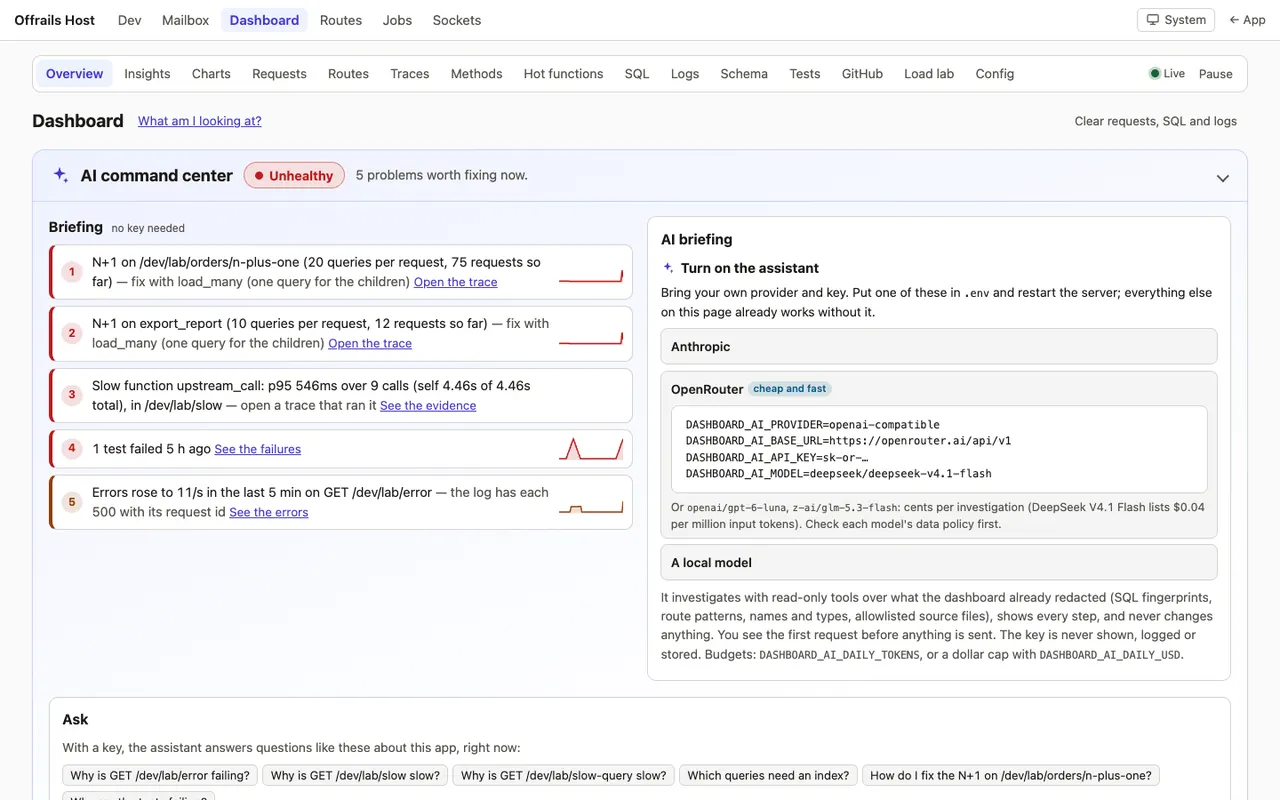
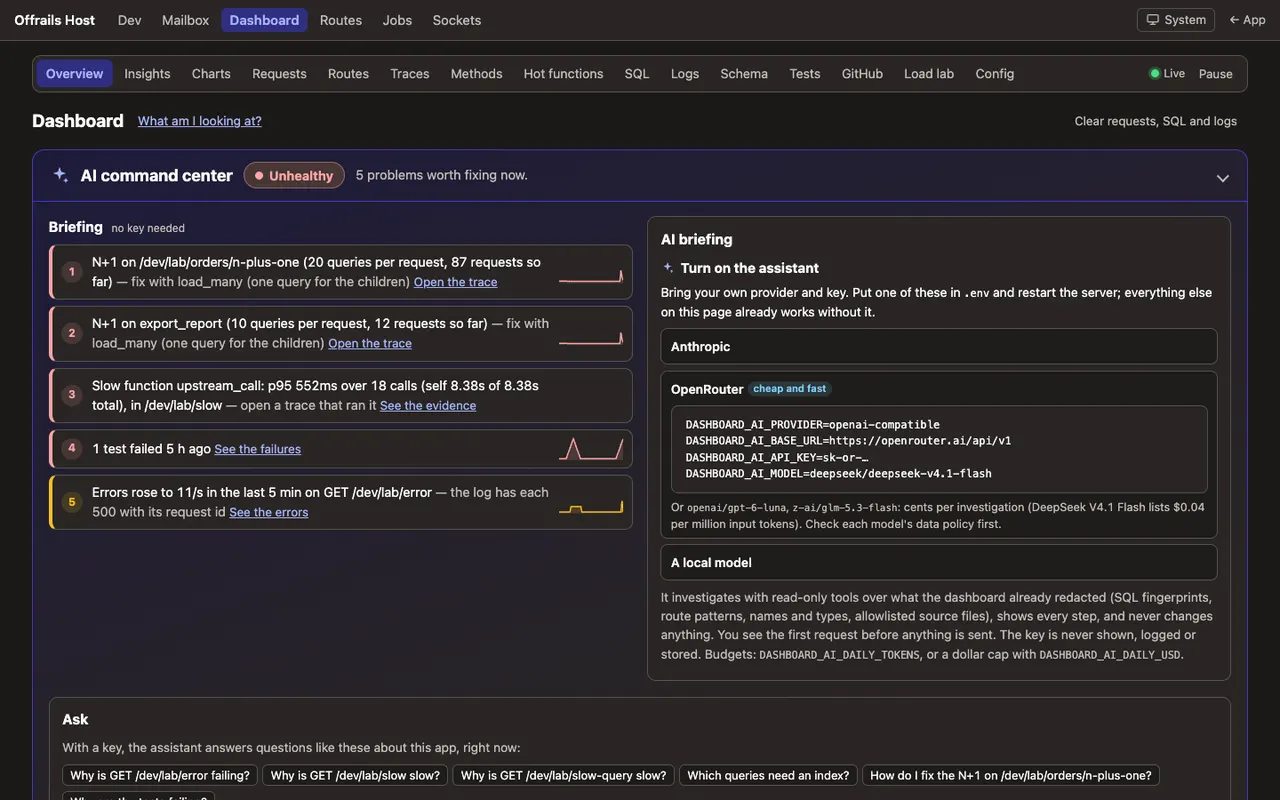
- AI command center (the top of the overview, expanded by default, collapsible and remembered in this browser): a briefing that needs no key (the app's state in 3 to 5 plain lines from the insights, N+1s, errors, incidents and test runs, e.g. "N+1 on /orders (20 queries per request) — fix with load_many", each with its evidence link and a sparkline) under a verdict chip (Quiet, Healthy, Watch, Unhealthy); with a key, the AI briefing (the agent's health summary, streamed live with citations and inline charts; written once per boot on the first visit in proactive mode, otherwise a button; its bottom line shows on load, at the top of the card and in the collapsed bar, from the latest finished briefing, cached on disk, even while a new one is being written); a prompt box ("Ask anything about your running app…") with suggestions drawn from the findings ("Why is GET /orders slow?") and quick links; four small charts of the last 15 minutes with the briefing's findings numbered on them; and What you can do here, a card per capability linking to its tab. Without a key the AI parts are a setup card (Anthropic, OpenRouter's cheap models, a local model).
- Overview: cards with sparklines, colored by health (green, amber, red; thresholds are
HEALTH,// APP:): memory (and its growth since boot), CPU, req/s, latency, server errors, SQL, pool, Tokio, uptime; the top insights, the slowest routes and queries, the latest traces and N+1s, and panels from other samples (the job queue whenjobsis installed). - Charts: ten live charts and a latency heatmap (SVG, light and dark, gradient fills), 5 min, 15 min, 1 h, 24 h, 7 days or 30 days, across restarts: the history lives on disk (below). Legends summarize the visible window (average and peak for rates, request-weighted percentiles for latency, "—" without data). A crosshair synchronized across every chart with a readout of all series; drag (or Shift+arrows) to zoom into a range; click Requests, Latency or Errors to open that minute's traces; markers for boots, load-lab runs and error bursts. All of it works from the keyboard, and every chart keeps a data table as its text alternative.
- Requests: per matched route: hits, 2xx/3xx/4xx/5xx, p50/p95/p99/max, bytes, last hit, the slowest examples (each a trace).
- Traces, an explorer on one screen: every request, every background job and mail delivery (the latest 300, plus the notable ones: a 5xx, an N+1, slower than 0.5 s, those also on disk). Filters as dropdowns and chips (route with hit counts, kind, status, minimum duration, N+1, errors, time range synced with the charts, text on the path, a method), all in the URL; a duration scatter above the list (x time, y duration, color status: drag across it to zoom, click a dot to open its trace); rows that open inline into their waterfall (
j/kto move, Enter to open, Esc to close); compare two traces side by side ("#12 ran 19 more queries than #9"); new traces stream in, held while you're reading. - The waterfall (the same component on the trace page, in the explorer's rows, a route's drawer on Requests, a statement's page, N+1 findings, a job's page on the jobs dashboard, the mail a request sent, and the Ask AI citations): a collapsible tree, one line per row (
SELECT lab_order_items WHERE order_id = ?, the full statement highlighted in the side panel), repeats folded (an N+1's 20 statements, orload_items ×20, as one row with a mini-bar per run), the framework's own checks folded into aframeworkrow, bars colored by kind (handler, method, SQL, template, job, outbound HTTP, middleware, events as markers), self time vs total, uninstrumented time hatched (where to add a span), waiting time (from the request's arrival to its first code: queueing for a worker, a permit or a connection) as a kind of its own, with a "the server is saturated" insight when requests keep waiting, the critical path marked, a header with time by kind as a stacked bar, the query and N+1 counts, the slowest step and a suggested fix. Click a row for its side panel (fields,file:line, the SQL with EXPLAIN, Ask about this, copy as JSON). Expand all, collapse all, "collapse repeated SQL"; the state stays in the URL hash. Without JavaScript every row is there (?all=1). - Upstreams (the APIs your app calls): every call made through
kernel::outbound, the small wrapper this sample ships as THE way to call an API (a timeout, safe retries with backoff, a W3Ctraceparent, a span, a size cap, nothing secret recorded), per service, method and route template (/items/{id}): calls, p50/p95/p99 against its SLO, error and timeout rates, retries, its timeout, which app routes call it and how much of their time it takes, a 30-minute sparkline; a dependency map (app routes → upstreams, edges as thick as their calls, colored by health; server-rendered SVG with a text alternative), each node a link to its traces. In the waterfall, outbound calls are their own color with the API's host as a chip, retries are grouped as attempts under their call, timeouts are red, and calls made one after another get a note: "these 4 calls run one after another; running them concurrently would save ~1.1 s", with the critical path. Insights: a slow upstream ("payments POST /charge p95 1.2 s (SLO 300 ms) — called by GET /dev/lab/checkout, 62% of its time"), a failing one, a retry storm, a call with no timeout, sequential calls that could be parallel. Ask AI'slist_upstreamsandget_upstreamanswer "which API is making checkout slow?". - Security: deterministic detectors over every request (the middleware sees them before the Host check, CSRF and the body limit answer) and every sign-in event (auth-core's audit trail through an optional wire, or the lab's sign-in form): scanners and probe paths (
/.env,/wp-login.php,/.git/config,/actuator…), scanner user agents (sqlmap, nikto, nuclei…), 404 bursts, path traversal (../and its encodings), SQL injection and XSS patterns in query strings, unusual methods (TRACE, PROPFIND), oversized bodies and headers, bad Host headers, CSRF rejections, CSP report spikes, rate-limit hits; brute force on one account, credential stuffing from one address; an address far busier than the median, one that mostly gets 4xx, rotates user agents or spans many sessions; one session used from several addresses. Each finding has its evidence (the requests, linked to their traces), a severity and what to do ("this address tried 30 accounts in 2 minutes — the per-account throttle held; add an IP-level limit or a WAF rule"). The Security tab: a verdict, a timeline by category, the top offending addresses, the findings and the latest flagged requests. Client addresses are personal data: production shows only their network and a keyed hash (203.0.113.x #a1b2c3), development shows them whole;APP_TRUSTED_PROXYdecides the client address. Also in the read-only production view. Ask AI:list_security_findings,get_security_event. - Frontend (real-user monitoring): a small beacon on every app page (
static/dashboard-rum.js, loaded once from the app layout, so it works after boosted navigation and swaps; CSP-compatible) reports rage clicks (3 clicks within 0.7 s on one element), dead clicks (a button or link-like element with no navigation, no DOM change and no request within 1 s), clicks followed by an error, JavaScript errors and unhandled rejections (message and stack, scrubbed), htmx errors (responseError,sendError,swapError,timeout), slow interactions (event → next paint over 200 ms) and the Core Web Vitals (LCP, CLS, INP) per page, each tied to the request id of its page or fetch, so it links to the trace. It never sends text, input values or query strings: elements are named by id,data-testid/data-rum, name, role and tag path. The Frontend tab: clicks that went wrong by page and element with a heat bar, errors grouped by message with first and last seen and the pages, Web Vitals per page colored good / needs improvement / poor, slow interactions; insights like "Rage clicks on #slow-report on /dev/lab/ux — the request it makes is slow (p95 1.4 s)", "Dead clicks on #show-code after boosted navigation" (the class of bug a page script that only runs on a full load causes), "JS error after boosted navigation", "Poor LCP on /". On by default in development; production only withDASHBOARD_RUM=true, sampled byDASHBOARD_RUM_SAMPLE. Ask AI:list_frontend_issues. - Methods: every span aggregated, profiler style (wall clock, so waits on the database count): calls, total and self time, p50/p95/max, share of request time, the routes that call it, callers and callees; click one for the traces that ran it. An icicle (flame graph, top down) of a route's traces merged. Instrumenting your own methods is one attribute (below).
- Hot functions (development, Linux and macOS): a low-rate CPU sampling profiler (99 Hz,
pprof) you start from the page (it samples until you stop it, 30 minutes at most;DASHBOARD_PROFILER=alwaysfrom boot), with no annotations at all: functions by self and total share, the usual path to each, callers and callees, your code vs dependencies vs std/Tokio vs native, the routes that were being served, and a flame graph. Pause and resume from the page; never in production. - History on disk: the charts' minutes (and hourly rollups), their markers, the notable traces and every job or mail run go to
storage/dashboard/history.sqlite3(its own SQLite file, compressed,0600), so a restart loses nothing but the minute in progress, and memory keeps only the hot window. 7 days of minutes, 90 days of hours, 14 days of notable traces, 64 MB at most (// APP:). About 70 KB of disk a day of history. - SQL: statements grouped by fingerprint (literals stripped): count, total, mean, p95, max, last seen, the routes that ran it, parameters as type and length only. The N+1 list (the same statement more than 5 times in one request) with route and trace. Writes during a GET. EXPLAIN (SQLite
EXPLAIN QUERY PLAN, PostgresEXPLAIN) for recorded SELECTs. - Logs: a live tail over Server-Sent Events, requests and log lines together (like Phoenix's request logger), filtered by level, target and text, with pause and resume. Secret-looking fields are
[redacted]. - Insights: findings ranked by impact, each with its evidence, a fix, the framework guide that explains it and the page that proves it (an N+1's waterfall opens right there): N+1 hotspots, slow routes and queries, slow functions (a method past its p95 threshold, one run in a loop, one getting slower, an app function hot on the CPU), rising errors, foreign keys without an index, full scans from EXPLAIN, large or fast-growing tables, pending migrations, jobs that keep failing, memory that keeps growing, a saturated pool, slow renders, and CSP violations the browser reports. Dismiss one for the session.
APP:hook for your own rules. - Routes: the route table grouped by area and resource, with each handler's source file and line, its access level and middleware, live hits, error rate, p50/p95 and a sparkline, links to its traces and SQL, a Try it link, and the problems: 5xx or rising errors, slow, never hit, no test mentions it, a mutating route without CSRF, an admin or dev path without a gate, a GET that writes, 404s seen with the route they probably meant and the page that linked there, overlapping patterns, routes missing from
docs/routes.md. - Schema: an entity-relationship diagram of the live database (SQLite or Postgres): table boxes with their columns, PK/FK/unique marks, foreign keys as edges with crow's-foot cardinality (a nullable foreign key is zero-or-one, a unique one is one-to-one). Laid out on the server (layered by foreign-key depth, crossings reduced with a barycenter pass), so it reads well without JavaScript; with it, pan, zoom, drag tables (remembered in this browser, with Reset layout), click or focus a table to light up its neighbours and see its detail, find a table, "keys only", colour by sample or by name prefix. Export as SVG or as Mermaid
erDiagramtext (copy button), for docs or an LLM. Below it, the text alternative: every table with its row count (and size on Postgres), columns, indexes and foreign keys, and the relationships in words. Each table has a page: neighbours, the recorded queries that touch it, the migration that created it. On a phone the diagram scrolls in its frame and the lists carry the rest. Never a row's data. - Migrations (a tab of Schema): every migration newest first, applied or pending, when, which sample or area, its file, and what it did (tables, columns and indexes created, altered or dropped, derived from the migration's source and labelled as such); pending ones get the host's Run button. Drift: tables or columns the applied migrations don't explain, ones they create that are missing, migrations applied but unknown to the code, and a migration file edited after it was applied (SeaORM keeps no checksum, so the dashboard records one per applied migration the first time it sees it). Drift shows in Insights too.
- Ask AI, an agent (optional, your own key): on every dashboard page and, through an Ask AI bar, on the other kernel pages (the mailbox and a message, the jobs dashboard, a job and the error groups, sockets,
/dev, the host's routes page). It investigates with read-only tools over what the dashboard already holds (overview and thresholds, insights, routes, before/after comparisons of any two windows, chart series, traces, SQL and EXPLAIN, logs, schema, migrations and drift, route problems, jobs and their failure groups, test results, CI, the mailbox as shapes, and the app's own source undersrc/,migration/andtemplates/), streams each step live ("Looking at the SQL… →query_sql(sort=total)", each result one click away), and answers with evidence as links ([trace:1298],[sql:…],[route:GET /x],[file:src/…:40]) and the charts it cites drawn inline. It can propose actions (run a load-lab scenario, run the tests, open a page) that show as buttons you click; it never changes anything itself. Answers that propose a change come with a fix prompt for your coding agent (evidence, file and line, the change, the test to add, the guide). Anthropic or any OpenAI-compatible endpoint (OpenAI, OpenRouter, Ollama, LM Studio). You see the first request before anything is sent; every investigation is kept in a history. Bounded: steps, tokens and time per run, a daily budget. Development only unless you turn it on behind the production view's gate. - Health and "what am I looking at": the command center's verdict and briefing (and, with a key, Generate AI briefing: the agent investigates and writes the verdict, what's healthy, what needs attention ranked, and what to fix first, each claim linked to its evidence), a "since you were away" digest, and
/dev/dashboard/explain, a guide to every card, chart, panel and page that needs no key, with "Explain more with AI" on each. - Proactive (opt-in,
DASHBOARD_AI_PROACTIVE=true, development): a watcher checks the deterministic signals (latency spike, error burst, new N+1, memory growth, job failures, schema drift, failing tests) and posts an incident card to the overview and Insights; with a key the agent investigates each one once (debounced, budgeted) and the card carries its narrative, evidence and proposed actions. - Tests:
app test(or the Run tests button) runs nextest on SQLite and Postgres with JUnit output; the page shows both side by side, the duration trend, the slowest tests, failures with their output, flaky tests, line coverage from llvm-cov, and which acceptance criteria inproduct/no test cites. - GitHub: the app's CI runs with their success rate by day, open pull requests and issues, the latest release, open Dependabot alerts. Cached for a minute, never fetched at boot, the token never shown.
- Load lab: fake data through an
APP:seed hook, a traffic generator against the app's own address (hard caps: 200 req/s, 60 s, 32 in flight), and seven scenarios that light up a panel each: slow query, N+1, panic, memory spike, slow endpoint, error burst, checkout fan-out.app bench --rps 50 --secs 10 --route /dev/lab/ordersfrom a terminal. Three more panels: simulated APIs (/dev/lab/checkoutcalls inventory, pricing, payments and shipping, served by the app itself under/dev/lab/upstream/{name}, one after another, concurrently withtokio::join!, or with retries; presets make payments slow at p95 1.2 s, make shipping fail 20% or add timeouts, and each API's latency, jitter, error and hang rates can be set), the attack simulator (a scanner run, brute force, credential stuffing, traversal and SQLi probes, CSRF-less POSTs, a stolen session, a request flood; this app's own address only, TEST-NET client addresses), and UX trouble (/dev/lab/ux: a slow button, a dead button, one that throws, and a widget whose script only works on a full page load;?simulate=1plays it all by itself, rage clicks included). - Config: settings and the app's env vars with secrets redacted, OS and build info, and what the dashboard itself holds in memory.
- For agents:
/dev/dashboard.jsonand adashboardsection in/dev/introspect.json. - It costs little: about 1 µs per request for the middleware in a release build, 6 µs for a whole development request with its SQL recorded, about 1 µs per method span (see How it works); fixed-size memory (a test pushes 20,000 requests and 5,000 statements through it and checks every bound; traces also have a byte budget), history on disk instead of in memory; nothing at all outside development unless you turn on the production view.
- Development only by default (404 in production, proven by a test). Optionally a read-only subset at
/admin/dashboardin production, behind the admin password or your admin accounts: no load lab, no EXPLAIN, no parameters, no logs, and traces without their log events or span fields (and Ask AI only withDASHBOARD_AI_IN_PRODUCTION=true).
Guides: .offrails/guides/dev-tools.md · errors-and-logging.md · database.md · testing.md · security.md.
Screens
Every screen in light and dark, on desktop and phone: the samples repository.
Install
By hand, in the app root:
- Crates (
cargo add, never with a version):sysinfo --no-default-features --features system,quick-xml,reqwest --no-default-features --features rustls,json,http2,tower --features util,flate2(the history's compression; already in the tree through tower-http),pprof --no-default-features --target cfg(unix)(the CPU sampler; Linux and macOS only, no C++ demangler),backtrace --target cfg(unix)(already pprof's; to drop its symbol cache). The history file uses SeaORM'ssqlx-sqlitefeature, which the host enables even for Postgres apps; keep it. - Copy
files/into the app, keeping the paths (.config/nextest.tomlincluded). In the test file and themain.rswiring, replaceoffrails_hostwith your crate name. - Wiring (each at its
samples: <anchor>comment when the app has one; otherwise at the spot described):src/kernel/mod.rs:pub mod dashboard;andpub mod outbound;(the outbound HTTP wrapper: THE way the app calls other APIs).migration/src/lib.rs:mod m20261016_000600_create_lab_orders;andBox::new(m20261016_000600_create_lab_orders::Migration)(the load lab's fake orders).src/config.rs: adashboard: DashboardConfigfield (in the struct,Debug,from_env,test()), and theDashboardConfigsection withDashboardAi,AiProvider,ai_base_url_ok,valid_repoandshown_env(the text is insample.toml).src/state.rs, inAppState::newbefore the state is built:let db = crate::kernel::dashboard::instrument(db, &config);(the SQL callback must be set before the connection is cloned).src/routes.rs: mount/admin/dashboardbehindDashboardAccesswhenaccess::admin_mounted(&config); insideif config.is_development() { … }mergeweb::dev_router(); in the outermost layers, just insideSetRequestIdLayer,.layer(from_fn(crate::kernel::dashboard::http::middleware)); apaths::dev_dashboard()helper; theROUTESrows (Access::Devfor/dev/…,Access::Adminfor/admin/dashboard/…).src/routes.rs, inside the sameif access::admin_mounted(&config)block:app = app.route("/rum", axum::routing::post(crate::kernel::dashboard::rum::collect));(the browser beacon's production endpoint; it answers 404 unlessDASHBOARD_RUM=true).- The browser beacon on app pages: in
src/views/mod.rs(ctx fields)pub dashboard_rum: Option<crate::kernel::dashboard::rum::Beacon>,; insrc/controllers/application.rs(ctx init)dashboard_rum: crate::kernel::dashboard::rum::beacon(state, &parts.headers),; intemplates/layouts/application.html(app head) the{% if let Some(rum) = ctx.dashboard_rum %}<script src="{{ rum.src }}" data-rum="{{ rum.endpoint }}" data-rid="{{ rum.rid }}" defer></script>{% endif %}line (the exact text is insample.toml). src/kernel/ui.rs: the Dashboard and Routes tabs, and"system"and"routes"inHIDDEN_TABS(the dashboard replaces them; their pages stay as the fallback).src/kernel/security.rs:"report-uri /dev/csp-reports"inDEV_CSP_EXTRA(development's CSP only).src/controllers/dev.rs: the Dashboard tile.src/kernel/introspect.rs:out["dashboard"].src/main.rs:Box::new(kernel::dashboard::trace::DashboardLayer)in the tracing layers;kernel::dashboard::serve_started(&state);whereservestarts;kernel::dashboard::serve_stopped();atserve stop(writes the minute in progress and pending traces); theBench,TestandDashboardsubcommands and their dispatch arms.templates/layouts/application.html: a footer link<a href="{{ paths::dev_dashboard() }}" hx-boost="false" class="link">Dashboard</a>..env.example:GITHUB_REPO,GITHUB_TOKEN,DASHBOARD_IN_PRODUCTION,DASHBOARD_HISTORY,DASHBOARD_HISTORY_PATH,DASHBOARD_PROFILER, and the commentedDASHBOARD_AI_*lines.templates/kernel/layout.html(the Ask AI bar on other kernel pages, development only): atkernel head,{% if let Some(bar) = crate::kernel::dashboard::ai_web::bar(chrome.theme.return_to.as_str()) %}with the bar's<link rel="stylesheet">and<script defer>; atkernel main(the top of<main>), the sameif letaround{% include "kernel/dashboard/_ai_bar.html" %}(the exact text is insample.toml); atkernel headtoo, the trace component's stylesheet and script for pages that embed a trace (waterfall::embed_assets). Without these anchors (an app made before they existed), add the two lines by hand: in<head>after the page's scripts, and first thing inside<main>.tests/app/main.rs:mod dev_dashboard_test;andmod dev_dashboard_signals_test;;security_test.rsrouter sources:src/kernel/dashboard/web.rs,src/kernel/dashboard/ai_web.rs,src/kernel/dashboard/lab.rs;kernel_web_test.rsno-store paths;theme_switch_test.rskernel pages.- With realtime installed:
pub mod ai_realtime;atdashboard modsinsrc/kernel/dashboard/mod.rsandBox::new(crate::kernel::dashboard::ai_realtime::Realtime),atdashboard ai sourcesinsrc/kernel/dashboard/ai_context.rs(/dev/sockets' Ask AI then knows the hub's topics, connections and rates). - With jobs-dashboard installed: at
job panelsintemplates/kernel/jobs/show.html, the job's trace (a lazy waterfall from/dev/dashboard/traces/lookup?job=, development only). With dev-mailbox installed: atmessage panelsintemplates/kernel/mailbox/_message.html, the trace of whatever sent the mail (lookup?mail=). - With auth-core installed: at
auth eventsinsrc/models/auth_event.rs,crate::kernel::dashboard::threats::auth_event(&format!("{kind:?}"), user_id, meta.ip.as_deref());(every audit event feeds the brute-force and credential-stuffing detectors); andpub mod accounts;atdashboard modsinsrc/kernel/dashboard/mod.rs,pub use crate::kernel::dashboard::accounts::{HAS_ACCOUNTS, admin_from_session};atdashboard accountsinsrc/kernel/dashboard/access.rs, andmod dev_dashboard_accounts_test;intests/app/main.rs.
cargo fmt --all && cargo run -- db migrate && cargo run -- routes, then the Definition of Done.
tools/install.sh dev-dashboard <app> does steps 1 to 3.
After installing
- Open
/dev/dashboard/lab, press N+1, and follow the link: that is the tour (open the foldedload_items ×20row, click a statement). For a demo,DASHBOARD_DEMO_HISTORY=truein.env(opt-in;tools/demo.shsets it) fills the last hour with synthetic history at boot, written to the history file flagged as demo data (it never overwrites a real minute) (traffic that swells, a deploy, a spike, an incident), every chart over it badged "demo data"; the real collector takes over from the first second.cargo run -- dashboard demoadds fake orders and a history of synthetic test runs;cargo run -- dashboard warmup --url http://localhost:3000drives a minute of mixed traffic and every scenario. docs/decisions.md:YYYY-MM-DD: installed the dev-dashboard sample (in-process metrics, traces, SQL, insights, load lab; development only); and the crates it added.storage/is git-ignored already; the history file lives there (storage/dashboard/history.sqlite3). Delete it any time: the dashboard starts a fresh one. A damaged or other-version file is moved aside (history.sqlite3.broken-<time>) with a warning, never fatal.- Method spans at
debuglevel show when the log filter lets them through: development's default (info,<your_crate>=debug) does; aRUST_LOG=infoin.envhides them (useRUST_LOG=info,<your_crate>=debug). .env:GITHUB_REPO=owner/name(and optionally a read-onlyGITHUB_TOKEN) for the GitHub page;TEST_DATABASE_URLfor Run tests on Postgres.- Ask AI (optional):
DASHBOARD_AI_PROVIDER=anthropicandDASHBOARD_AI_API_KEYin.env(never committed; the model defaults toclaude-sonnet-5-5;claude-opus-5-5answers deeper,claude-haiku-5-5cheaper). OpenRouter, a local model or any OpenAI-compatible endpoint instead: see "Ask AI on OpenRouter" below. Record the provider choice indocs/decisions.md. With none set, each page's Ask AI and the command center show how to enable it, and the briefing and "What am I looking at?" (/dev/dashboard/explain) work without a key. Budgets per process and UTC day, all optional in.env:DASHBOARD_AI_DAILY_QUESTIONS(200),DASHBOARD_AI_DAILY_TOKENS(10,000,000: an agent run re-sends its context on every step, 40–50k tokens a run),DASHBOARD_AI_RUN_MAX_TOKENS(300,000),DASHBOARD_AI_MAX_ANSWER_TOKENS(8,000; a cut answer gets a Continue button), and a dollar cap:DASHBOARD_AI_PRICE_INandDASHBOARD_AI_PRICE_OUT(the model's USD per million tokens) withDASHBOARD_AI_DAILY_USD; the panel then shows the estimated spend today next to the tokens left. A refusal names the limit and the variable that raises it. - Call every external API through
kernel::outbound(Adapting it, "Calling other APIs"); areqwest::Clientused directly is invisible to Upstreams and has no timeout. - The browser beacon is on in development. For production, decide with whoever owns the data, then
DASHBOARD_RUM=true(withDASHBOARD_IN_PRODUCTION=trueand its gate) and aDASHBOARD_RUM_SAMPLE(0.1 by default); record it indocs/decisions.md. Behind a proxy setAPP_TRUSTED_PROXY=true, or every client is the proxy's address on the Security tab. DASHBOARD_AI_PROACTIVE=true(development) turns on the watcher and its incident cards; with a provider it spends part of the day's budget on its own (at mostPER_HOURinvestigations an hour), so leave it off unless you want that.app testreplaces nothing in CI: CI keeps runningcargo nextest runon both databases. Runapp testlocally to see the runs on the Tests page.- A test that builds
TestAppwith a development config and counts queries: the dashboard's SQL callback replacesTestApp's counter in development (SeaORM keeps one callback). ReadHUB.sqlthere, or use the test config.
Adapting it
-
Calling other APIs (THE way): one
Outboundper API, built from config, then a call per request. It sets a timeout (DEFAULT_TIMEOUT, 10 s, or the client's or call's own), retries only what is safe to retry (GET,HEAD,PUT,DELETE, or a call marked.idempotent()because it carries an idempotency key) on timeouts, failed connections, 429, 502, 503 and 504 (retries(n), at mostMAX_RETRIES, with backoff and jitter), never follows a redirect, sends atraceparentwhose trace id is the request's id, caps the answer atMAX_BODY, and opens anhttpspan (onehttp_attemptper try) that the waterfall and Upstreams read. Constants are// APP:inkernel/outbound.rs.let payments = Outbound::new("payments", &config.payments_url)?.timeout(Duration::from_millis(800)); let reply = payments.post("/charges").bearer(&config.payments_key).json(&charge).idempotent().retries(2).send().await?; let charge: Charge = reply.error_for_status()?.json()?; // Independent calls together: the slowest one sets the time. let (stock, rates) = tokio::join!(inventory.get(&format!("/items/{id}")).send(), shipping.post("/rates").json(&parcel).send()); -
Wrap your own API client (a vendor SDK, a gRPC client, a client with its own reqwest inside): give it
.with_client(...)if it takes areqwest::Client, or report each call yourself: opentracing::info_span!("http", service = "stripe", http.method = "POST", http.host = "api.stripe.com", http.route = "/v1/charges", timeout_ms = 800, http.status = tracing::field::Empty, outcome = tracing::field::Empty, attempts = tracing::field::Empty)around it, record the status and outcome, and hand akernel::outbound::CallRecordtooutbound::report(the observer the dashboard registered). Never put an id or a query inhttp.route: useoutbound::route_template(path). -
Upstream SLOs and thresholds:
SLO_P95_USand per serviceSLOS,FAILING_SHARE,MIN_CALLS,RETRY_STORM,SEQUENTIAL_SAVING_US(// APP:inkernel/dashboard/upstreams.rs). -
Tune the security detectors: every threshold is an
// APP:constant at the top ofkernel/dashboard/threats.rs(WINDOW_SECS,SCAN_404S,PROBE_HITS,BRUTE_FAILURES,STUFFING_ACCOUNTS,RATE_FLOOR,RATE_FACTOR,UA_ROTATION,SESSION_IPS,CSP_SPIKE…), with the lists they match (PROBE_PATHS,SCANNER_AGENTS,SIGN_IN_ROUTES: put your own sign-in paths there if you don't use auth-core). A detector is a block inThreats::findings; add yours there and a synthetic stream for it insecurity_detectors_fire_on_synthetic_streams. -
Wire a WAF or alerting: the dashboard detects, it doesn't block. To act on a finding, read
HUB.threats(Threats::findings(now), each with its kind, severity and the address as shown) from a recurring job or the watcher (ai_watch::detect) and post to your alerting webhook throughkernel::outbound; to block, put the address or the scanner's user agent in your proxy's or WAF's deny list (Cloudflare, AWS WAF, Caddy'sremote_ipmatcher), never in the app. In production the addresses are truncated and hashed, so a block rule needs the proxy's own logs. -
The beacon: thresholds (
RAGE_CLICKS,RAGE_MS,DEAD_MS,SLOW_MS) are at the top ofstatic/dashboard-rum.js; the server's caps and the Web Vitals thresholds are// APP:inkernel/dashboard/rum.rs. Name an element for the reports withdata-rum="publish"(or a stableid); never put personal data in either. A clickable element the dead-click check should skip (it acts later on purpose): give itdata-rum-async(oraria-disabled="true"while it works). -
Instrumenting your own methods (GUIDE:
.offrails/guides/errors-and-logging.md#logging): one attribute on the function, and it shows in every waterfall nested with its SQL, in Methods, and in the slow-function insights:#[tracing::instrument(level = "debug", skip_all)] async fn load_items(db: &DatabaseConnection, order_id: i64) -> Result<Vec<order_item::Model>, DbErr> { … }skip_allkeeps arguments out (a password, a user, a whole model); add a field only for what helps you debug and is neither a secret nor personal data:fields(order_id)thentracing::Span::current().record("order_id", order_id). Fields named like secrets show as[redacted]anyway, and the production view never shows fields.level = "debug"costs nothing in production (the filter isinfothere: the span is never built) and about a microsecond in development. Name a spanhandler(withhandler = "orders::show") for a controller action,renderfor a template,httpfor a call out,job/mail/cronfor the outermost span of background work (it becomes a trace of its own); everything else is a method. The waterfall shows itsfile:linefrom the span's metadata. Where a span has lots of hatched (uninstrumented) time, add one inside. The lab's N+1 page (lab.rs,load_orders_one_by_one→load_items) is the worked example. -
History on disk:
DASHBOARD_HISTORY=falsekeeps everything in memory (as before);DASHBOARD_HISTORY_PATHmoves the file (a mounted volume). Retention and the ceiling areMINUTE_DAYS,HOUR_DAYS,TRACE_DAYS,MAX_TRACES,MAX_BYTES(// APP:inkernel/dashboard/history.rs): about 70 KB a day for the charts, a few KB per notable trace. With the production view on, production writes the file too, without span fields or log events. -
Hot functions:
DASHBOARD_PROFILER=falseremoves the sampler,alwaysstarts it at boot;FREQUENCY,WINDOW,MINUTES,MAX_STACKS,MAX_RUNare// APP:inkernel/dashboard/profiler.rs. WHY on demand: symbolizing a debug build maps its debug info, andpprofkeeps its sample table once started (measured on the demo app: 40 MB RSS without it, 440 MB while sampling, 260 MB after stopping until a restart). "Your code" is the frames under this crate's name. On Windows the page says it isn't available (spans still work). -
Queueing: a request that waited
WAIT_US(100 ms) or more before its code ran, for at leastWAIT_SHAREpercent of its time, counts;WAIT_MIN_TRACESof them make the saturation insight (// APP:inkernel/dashboard/insights.rs); rows shorter thanWAIT_ROW_USaren't drawn (waterfall.rs). -
Slow functions:
SLOW_METHOD_US,CALLS_PER_TRACE,GROWTH_MIN_US,HOT_CPU_SHARE(// APP:inkernel/dashboard/insights.rs). Repeats fold atGROUP_MIN(waterfall.rs). -
Load-test your own pages: point
lab::seed(// APP:inkernel/dashboard/lab.rs) at your models, then put your routes in the Traffic form orapp bench --route. Drop thelab_orderstables with a new migration when you no longer need them. -
A panel for your own subsystem (realtime, a payment queue): implement
PanelProviderand add it toproviders()(// APP:inkernel/dashboard/panels.rs; the realtime example is in its header). -
Your own insight rules: return findings from
custom_rules(// APP:inkernel/dashboard/insights.rs); tune the thresholds at the top of that file (slow route p95, slow query p95, table sizes). -
The dashboard in production, read-only:
DASHBOARD_IN_PRODUCTION=trueandAPP_ADMIN_PASSWORD(16+ characters), or your admin accounts: with auth-core installed, the optional wiring compileskernel/dashboard/accounts.rs(signed-in people are asked first;is_adminis the// APP:hook, nobody until you add a role), otherwise write your ownadmin_from_sessionbesideno_accountsinkernel/dashboard/access.rs. Behind a proxy setAPP_TRUSTED_PROXY=true, or every client shares one failed-password budget (a warning says so once). It records in production then (a few µs per request). -
Send traces to a collector: set
OTLP_EXPORTand fillexport(// APP:inkernel/dashboard/trace.rs) with the opentelemetry crates. -
Group the diagram by your own areas: add
("billing_", "billing")rows toAREAS(// APP:inkernel/dashboard/erd.rs, first match wins); the colours are--g0…--g9(/* APP: */indashboard.css). For a bigger schema, tuneMAX_COLUMNandGRID_WIDTHthere. -
Ask AI on OpenRouter (OpenAI-compatible, with tool calling), e.g. a cheap fast model. In
.env(the key yours, never committed):DASHBOARD_AI_PROVIDER=openai-compatible DASHBOARD_AI_BASE_URL=https://openrouter.ai/api/v1 DASHBOARD_AI_API_KEY=sk-or-… # your OpenRouter key DASHBOARD_AI_MODEL=deepseek/deepseek-v4.1-flash # or openai/gpt-6-luna, z-ai/glm-5.3-flash DASHBOARD_AI_PRICE_IN=0.04 # optional: USD per million tokens, for the spend estimate DASHBOARD_AI_PRICE_OUT=0.55 DASHBOARD_AI_REFERER=http://localhost:3000 # optional: OpenRouter's HTTP-Referer DASHBOARD_AI_TITLE="My app dev dashboard" # optional: OpenRouter's X-Title (quote values with spaces: an unquoted space stops .env loading there)Model ids come from OpenRouter's public list (
curl -s https://openrouter.ai/api/v1/models); pick one whosesupported_parametersincludetoolsandtool_choice. On 2026-10-17 all three above did, listed at $0.04 / $0.55 (DeepSeek V4.1 Flash), $0.10 / $0.50 (GPT-6 Luna) and $0.15 / $0.50 (GLM-5.3 Flash) per million input / output tokens: cents per investigation. Check each model's data policy on OpenRouter before sending your app's data to it. Token use per run is kept down on every provider: a tool result older than the last step is cut toOLD_RESULT_CHARS(ai_agent.rs; the model can call the tool again), Anthropic (andanthropic/models through OpenRouter) getcache_controlmarks on the system prompt and the conversation so far, and OpenAI-compatible providers such as DeepSeek cache a repeated prefix by themselves. -
Ask AI with another provider or tighter limits: any OpenAI-compatible endpoint works through
DASHBOARD_AI_BASE_URL(https, or http to localhost: Ollamahttp://localhost:11434/v1, LM Studiohttp://localhost:1234/v1). Budgets and caps: theDASHBOARD_AI_*budget variables above; their defaults and the rest arePER_MINUTE,DAILY_REQUESTS,DAILY_CALLS,DAILY_TOKENS,MAX_STEPS,RUN_TOKENS,RUN_TIMEOUT,MAX_CONTEXT_CHARS,MAX_ANSWER_TOKENS,TIMEOUT(// APP:inkernel/dashboard/ai.rs), andMAX_TOOL_CHARSand theread_sourceallowlist (ai_tools.rs); the prompts and guides per page areTab::suggestionsandTab::guides, the system prompt issystem_prompt. To send more or less about a page, edit its builder inkernel/dashboard/ai_context.rs(each is// APP:): keep to redacted data, and extendai_contexts_carry_no_rows_parameters_or_secretswhen you add a source. -
Add your own tool (say,
payments_summary): add aToolDefrow toTOOLSinkernel/dashboard/ai_tools.rs(a name, the step's title, a description that says what it returns and when to use it, and a JSON schema), and an arm incallthat returns redacted text (ai_context::cleanfor free text; shapes and counts, never values); setcore: trueif small models should get it,read_only_view: trueonly if it is safe in production. Keep it read-only: an action belongs behind a button, as a newpropose_actionkind rendered inai_web::action_viewand posting to an existing CSRF-checked route. Add its arguments toevery_tool_answers_within_its_cap. Another sample's data without a compile-time dependency: read its table by name (panels::table_exists,ai_context::text_rows, as the mailbox and jobs tools do), or register anai_context::Sourcethrough optional wiring (asai_realtime.rsdoes with realtime). -
Tune it for a small model (a local 7–30B model, a cheap tier):
DASHBOARD_AI_TOOLS=coreoffers only the core tools (overview, insights, requests, compare, traces, SQL, logs, source, proposals; thecoreflags inTOOLS); lowerMAX_STEPSto 4 andMAX_CONTEXT_CHARSto 8,000–12,000 so the first message fits a small context window; keep the suggested prompts concrete (Tab::suggestions), since small models do best with a precise question; and check the model'ssupported_parametersincludetools(a model without tool calling still answers from the page data, without steps). -
Ask AI on more pages:
Tab::for_page(ai.rs) maps a kernel page's path to a tab (and an item); add your page there, aTabvariant with its suggestions and guides, and its context builder inai_context::build. The bar shows on any kernel pagefor_pageknows. -
The command center: the verdict's rules (
verdict), the briefing's length (MAX_BULLETS,MIN_BULLETS), the suggested questions (suggestions), the capability cards (guide) and the headline are// APP:inkernel/dashboard/ai_home.rs; its tint is--cc-washand--cc-edge(/* APP: */indashboard.css). Each tab's one-line guide isTab::guide_line(ai.rs). -
The watcher's signals: tune
SPIKE_FACTOR,ERROR_BURST,JOB_FAILURES,DEBOUNCE,PER_HOUR, and its boot warm-up (WARMUP: the first look a minute after boot;BOOT_INVESTIGATIONSin the firstBOOT_WINDOW, the most severe first; the Ask AI panel shows the watcher's share of today's tokens) (// APP:inkernel/dashboard/ai_watch.rs), or add a signal todetect; the agent investigates whateverdetectreturns. -
Ask AI in production (read-only view, its four tabs):
DASHBOARD_AI_IN_PRODUCTION=truewithDASHBOARD_IN_PRODUCTION=trueand an admin gate. The provider then sees production's redacted SQL shapes and route numbers: decide that with whoever owns the data, and record it indocs/decisions.md. -
More history or a smaller footprint:
RECENT,NOTABLE,TRACE_BYTES,LOG_LINES(trace.rs),MAX_SPANS,MAX_SQL(http.rs),MINUTE_POINTS(series.rs),MAX_FINGERPRINTS(sql.rs),N_PLUS_ONEandIGNORED(http.rs),MAX_RPS/MAX_SECS(lab.rs); every one is// APP:.
Do not change
- Dev routes exist only in development;
/admin/dashboardonly with an admin gate (the_dashboard_is_404_in_production_by_default,the_production_dashboard_needs_the_admin_password). - Parameters show as type and length, never values; EXPLAIN only for SELECTs (
sql_parameter_values_never_reach_any_page,explain_runs_for_selects_only). - The traffic generator takes paths, never URLs (
traffic_only_targets_this_app). - Every ring and map has a fixed size; the unmatched-path bucket is one bucket (
the_dashboard_stays_within_its_memory_bound). - The GitHub token stays in its header (
the_github_token_is_never_shown_or_logged). no_store()on both routers (every_dashboard_response_is_no_store).- The CSRF probe uses a method the route doesn't have, so it never runs a handler (
a_mutating_route_without_csrf_is_spotted). - Styles live in
static/kernel/dashboard.csswithlight-dark()tokens, never inassets/app.css(every_dashboard_page_renders_with_its_own_assets,the_dashboard_stylesheet_follows_the_theme_switch). - Ask AI starts only from a previewed first request built from redacted data, sends it to a base URL from the environment (https or loopback, no redirects), and renders answers as escaped text (
only_the_previewed_context_is_sent,ai_contexts_carry_no_rows_parameters_or_secrets,the_ai_base_url_is_https_or_loopback,the_ai_client_handles_errors_timeouts_oversize_and_redirects,a_model_reply_with_markup_renders_inert). - Every tool reads; an action is only a validated proposal the human clicks; tool output is delimited as untrusted data (
a_prompt_injection_in_app_data_has_no_side_effect_and_leaks_nothing,proposed_actions_are_validated_and_render_as_buttons).read_sourcekeeps its allowlist (read_source_stays_inside_the_allowlist). Citations link only to validated dashboard pages (citations_link_only_to_validated_dashboard_pages). Runs stay bounded and say why they stopped (an_agent_run_stops_at_its_budget_and_says_so), and a run's stream belongs to its browser (a_run_stream_is_bound_to_its_browser). - The latest finished AI briefing's bottom line renders with the page, no click and no stream needed (
the_ai_briefing_summary_shows_on_load). - The overview's AI briefing starts on its own only in proactive mode, in development, once per process, inside the budget (
the_command_center_briefs_without_a_key_and_with_one); the briefing, the graphs and the guide work without a key. - A live run (its page and stream) is its browser's only; a finished one opens from its permalink in any browser that can open the dashboard, as the history does (
a_run_stream_is_bound_to_its_browser). - The AI key stays in its header (
the_ai_key_never_reaches_logs_traces_pages_or_recorded_requests); Ask AI is 404 in production unless turned on behind the gate (the_ai_assistant_is_404_in_production_unless_enabled_behind_the_gate). erd.rsroute/glyphanddashboard-erd.jsroute/glyphdraw edges the same way: change them together (the_layout_is_deterministic_layered_and_overlap_free).- The history file is
0600in a0700folder, holds only what the dashboard already redacted, and in production no span fields or log events (the_history_file_is_private_and_redacted); a damaged one is moved aside, never fatal (a_damaged_or_incompatible_history_file_is_moved_aside). - The CPU sampler never starts outside development (
the_profiler_never_runs_outside_development). kernel::outboundfollows no redirect, refuses credentials in a base URL, and records route templates only, never a query, a header value or a body (outbound_calls_are_traced_redacted_and_bounded).- Production keeps client addresses as their network and a keyed hash; only the simulator's own secret lets a request claim an address (
client_addresses_are_truncated_in_production,a_simulated_client_address_needs_the_simulators_secret). - The attack simulator and the simulated APIs target this app's own address only, in development (
the_attack_simulator_lights_up_every_detector,the_checkout_fan_out_traces_four_upstreams). - The beacon sends no text, values or query strings, and the endpoint keeps only validated fields, same-origin, capped and rate-limited (
rum_reports_keep_no_text_values_or_queries,the_rum_endpoint_is_same_origin_capped_and_rate_limited); it is off in production unless enabled (the_beacon_loads_in_development_and_in_production_only_when_enabled).
How it works
Everything is in this process, in one hub (kernel/dashboard/mod.rs, HUB) of fixed-size rings and maps:
| Part | Hooks in at | Records |
|---|---|---|
http.rs | a middleware at the router's outermost layer (outside the panic and timeout layers) | per ROUTES pattern: count, status classes, a log-bucketed latency histogram, bytes, the 3 slowest traces, per-minute history; 404 paths; writes during a GET |
sql.rs | SeaORM's set_metric_callback (sea-orm 2.0.4), installed in AppState::new | per fingerprint: count, histogram, routes, redacted parameters; per request: every statement for the trace and the N+1 count |
trace.rs | a tracing-subscriber layer in main.rs | spans and events of each request (its trace), every log line (the live tail) |
collector.rs | a task serve starts | once a second: RSS, virtual memory, CPU (sysinfo), open files, Tokio (workers, alive tasks, global queue, busy time; more with --cfg tokio_unstable), the pool (size, idle, max; sqlx doesn't count waiters, so saturation is "no idle connection at max size"), requests and SQL; in memory 15 min at 1 s and 2 h at 1 min, every closed minute to the history file |
history.rs | a thread of its own, started by serve | the history file: minutes (one row per hour: columns delta-encoded as varints with the minute's latency histograms, deflated), hourly rollups (one row per day), markers, notable traces (compressed JSON); retention and the size ceiling hourly; reads for the long ranges, zooms, permalinks and the AI tools |
waterfall.rs, methods.rs, traces_web.rs | the traces | the tree (folds, self time, gaps, critical path), the explorer, compare, methods, icicles |
profiler.rs | a thread serve starts (development, unix), sampling only when started from the page | pprof at 99 Hz, symbolized every 15 s into per-minute profiles (15 kept, 1,500 stacks each) |
insights.rs, route_explorer.rs, schema.rs | the above, the database catalog, CSP reports | findings, route problems, the schema |
upstreams.rs (and kernel/outbound.rs) | the outbound wrapper's observer, called from the caller's task; its http spans | per service × method × route template: count, histogram, errors, timeouts, retries, calls without a timeout, callers and their share, per-minute trend (100 upstreams, 20 callers each); sequential and concurrent calls from the waterfall's tree |
threats.rs | the middleware (before the request runs, then its status), auth-core's audit trail (optional wire), CSP reports | flagged requests (2,000), per address (1,000), session (1,000) and account (1,000) aggregates over a 10-minute window, a per-minute timeline; the detectors, deterministic over that state |
rum.rs (and static/dashboard-rum.js) | a beacon on app pages (app head), POST /dev/dashboard/rum (production: POST /rum) | clicks by page × element × kind (300), errors by message and source (200), per page Web Vitals histograms and slow interactions (200) |
erd.rs, migrations.rs | the catalog, seaql_migrations, migration/src/*.rs | the diagram's layout and exports; the timeline, derived effects, drift, the checksum ledger (storage/dashboard/migration-checksums.json) |
ai.rs, ai_context.rs, ai_tools.rs, ai_agent.rs, ai_watch.rs, ai_web.rs, ai_home.rs | the above, on request (and the opt-in watcher every 10 s) | per-page contexts, prepared previews (32 for 15 minutes), the tools, live runs (16 in memory) and their history (storage/dashboard/ai-runs/, 50), incident cards (20), the provider client, the rate and budget |
Annotations (boot, load-lab runs, error bursts over ERROR_BURST per second, the demo's deploy and incident) are kept with the series (200 at most) and drawn on every chart. A request's context lives in a Tokio task-local while it runs, so the SQL callback and the tracing layer attach to it without passing anything around. The dashboard's own pages and streams run "quietly" and record nothing. The diagram follows the charts' approach: erd.rs computes the layout and draws the SVG on the server (CSS-token colours, so light and dark need nothing), and dashboard-erd.js (about 400 lines, no library) moves it. WHY no layout library: a layered layout with a barycenter pass is about 150 lines for a schema of tens of tables, deterministic (so tests can pin it), and needs nothing vendored or from a CDN under the strict CSP. Ask AI is an agent loop on the server: the panel loads its context when opened (the preview is the exact first request: system prompt, page data and every tool's schema), and Investigate posts it (POST …/ai/runs, CSRF-checked) to start a run in the background. Each step sends the conversation with tools, runs the tool calls the model asks for (Anthropic tool_use blocks answered by one user turn of tool_result blocks; OpenAI-compatible tool_calls answered by one role: tool message each; several at once is fine), and appends both in that provider's shape; the last allowed call has tool_choice: none, so it must answer. The page follows the run over Server-Sent Events (GET …/ai/runs/{id}/stream, bound to the browser that started it): each step arrives as a fragment Askama rendered (title, the call, its result one click away), then the end: the answer as escaped blocks whose citation tags became links to the dashboard's own pages, the cited charts drawn by the Charts page's code, the proposed actions as buttons, and the fix prompt. WHY a POST then a GET stream: an EventSource can only GET, and the POST is what CSRF protects; WHY server-rendered fragments: one escaping path for everything the model writes. Without JavaScript the same form posts to …/ai/ask, which waits for the run and renders the finished page. The opt-in watcher (ai_watch.rs) reuses the same runs for its incident cards.
Charts are SVG rendered on the server (one implementation, works without JavaScript, nothing to vendor, the strict CSP untouched; colors are CSS tokens, so the theme switch needs no redraw); dashboard.js swaps in re-rendered fragments from a Server-Sent Events stream (every 5 s with prefers-reduced-motion, never while the tab is hidden), and adds the synchronized crosshair, the readout, zoom (?from=&to=, within the last 24 hours) and the click into /dev/dashboard/traces?minute=. The 1 h range and anything longer reads the history file through history::between (memory wins where both have a minute, so the hot/cold boundary has no seam); legends average every sample read, not the 300 drawn.
History on disk. WHY its own SQLite file and not the app's database: the app's migrations stay the app's, it works the same for Postgres apps, a db reset doesn't wipe it, and it is one file to delete. WHY a row per hour with a compressed blob: a minute is ~30 numbers that barely change; column-wise deltas as varints, then deflate, make an hour of minutes (histograms included) 1–3 KB, and a 24 h chart 24 row reads. Writes go through a channel to the history thread (never on a request), minutes as they close, traces in batches every 5 s; a crash loses the minute in progress. The thread answers the synchronous readers (charts, insights, AI tools) in a few milliseconds. Hours are rolled up from the minutes' merged histograms, so a 30-day chart's p95 is a true p95.
Method spans and the CPU sampler. The tracing layer already saw every span inside a request; now each carries its file:line, background work gets traces of its own (a root job, mail or cron span outside a request; its SQL finds the trace through the subscriber's registry), and the caps are 2,000 spans, 1,000 statements and 100 events per trace, past which they are counted ("Truncated"), with an 8 MB byte budget for the rings. method_spans_are_cheap measures about 1 µs per span in a debug build (each is a field visit, a timestamp and a push onto its trace; a request opening 200 of them), and fails above 25 µs. The sampler (pprof, signal-based) costs the samples themselves (99 per second per busy thread) plus a fold every 15 s, shown on the page (tens of milliseconds, on its own thread).
Overhead, measured by the_middleware_overhead_is_small (a trivial route behind the middleware alone, recording on and off on alternate requests, compared by median over 3,600 requests): 1.2 µs per request in a release build, about 5 µs in a debug build; the test fails above 10 µs (release) or, in debug, above 50 µs or 4× the bare request, whichever is larger (a CI runner is several times slower). A whole development request through every layer, with its SQL recorded and its trace and log line written, measured 6.3 µs more (97 → 103 µs for a static page, release). With the dashboard off (production by default, and tests) the middleware checks one atomic flag.
| Route | Does |
|---|---|
GET /dev/dashboard | the overview |
GET /dev/dashboard/{charts,requests,routes,traces,sql,logs,insights,schema,tests,github,lab,config,upstreams,security,frontend} | the pages |
GET /dev/dashboard/traces?upstream=&rid= | the traces that called an API; the trace of a request id (a browser report's page or fetch) |
POST /dev/dashboard/rum, POST /rum | the beacon's reports (development; production with DASHBOARD_RUM=true): same-origin, 16 KB, 60 a minute per client |
POST /dev/dashboard/lab/{upstreams,attack} | the simulated APIs' behavior; run the attack simulator (CSRF applies) |
GET /dev/lab/checkout?mode=sequential|parallel|retry, GET|POST /dev/lab/upstream/{name}/{action}, GET /dev/lab/upstream/{name}/{action}/{id} | the checkout fan-out and its four simulated APIs |
GET|POST /dev/lab/sign-in, GET /dev/lab/ux, /dev/lab/ux/widget, /dev/lab/ux/slow | the lab's sign-in form (for the attack simulator); the UX trouble pages |
GET /dev/dashboard/traces?route=&kind=&status=&min=&n1=&err=&range=&from=&to=&q=&fn= | the traces explorer |
GET /dev/dashboard/traces/{id} (?all=1), /traces/{id}/waterfall, /traces/{id}/json | a trace's waterfall (every row); the waterfall as a fragment; the trace as JSON |
GET /dev/dashboard/traces/compare?cmp=&cmp=, /traces/lookup?job= or ?mail= | two traces side by side; a job run's or a mail's trace (a fragment) |
GET /dev/dashboard/methods?sort=&route=&focus=&range=, /profile?window=&filter=&fn=&focus= | methods and a route's icicle; hot functions and the flame graph |
POST /dev/dashboard/profile/toggle | pause or resume CPU sampling (CSRF applies) |
GET /dev/dashboard/sql/{id} | a statement with its plan and the traces where it ran |
POST /dev/dashboard/sql/{id}/explain | EXPLAIN a recorded SELECT |
GET /dev/dashboard/schema/{erd.svg,erd.mmd} | the diagram as an SVG file, as Mermaid text |
GET /dev/dashboard/schema/tables/{name}, /schema/migrations | a table's page; the migrations timeline |
GET /dev/dashboard/ai?tab=&item=&q=, /ai/panel?tab=&item= (or ?page=<kernel page path>) | Ask AI: its page, the panel fragment |
POST /dev/dashboard/ai/runs, /ai/ask | start a run (live fragment, or redirect); start one and wait for it (no JavaScript); CSRF applies |
GET /dev/dashboard/ai/runs/{id}, /ai/runs/{id}/stream?from=, /ai/history | a run's page; its live steps (Server-Sent Events, its browser only, from step from); past runs |
POST /dev/dashboard/ai/runs/{id}/continue | one more call for an answer cut at its length, in the same run (its browser only; counts against the budget; CSRF applies) |
GET /dev/dashboard/explain | "What am I looking at?" (no key needed) |
GET /dev/dashboard/stream?view=…, /logs/stream?level=&target=&q= | Server-Sent Events: fragments, log lines |
POST /dev/dashboard/lab/{seed,clear,traffic,stop,scenario}, /tests/run, /insights/dismiss, /reset | actions (CSRF applies), each redirecting with a flash |
POST /dev/csp-reports | the CSP report-uri (development only) |
GET /dev/lab/{orders,orders/n-plus-one,slow-query,slow,panic,error} | the lab's demo routes |
GET /dev/dashboard.json | the numbers, for agents |
GET /admin/dashboard/{,charts,requests,traces,traces/{id},traces/{id}/waterfall,traces/{id}/json,traces/compare,traces/lookup,methods,sql,sql/{id},config,stream} | the read-only view (traces without span fields or log events) |
GET /admin/dashboard/{explain,ai,ai/panel,ai/runs/{id},ai/runs/{id}/stream,ai/history}, POST /admin/dashboard/ai/{ask,runs,runs/{id}/continue} | Ask AI in the read-only view (404 unless DASHBOARD_AI_IN_PRODUCTION=true; its four tabs, the read-only tool set) |
Files
| File | What |
|---|---|
src/kernel/dashboard/mod.rs | the hub, instrument, serve_started, snapshot |
src/kernel/dashboard/http.rs | the middleware, route matching, per-route stats, 404s, writes during a GET |
src/kernel/dashboard/sql.rs | the SQL callback, fingerprints, redaction, N+1, EXPLAIN |
src/kernel/dashboard/trace.rs | the tracing layer (requests, jobs, mail), traces, the log ring, the OTLP hook |
src/kernel/dashboard/history.rs | the history file: its thread, the chunk format, retention, reads |
src/kernel/dashboard/waterfall.rs, methods.rs, profiler.rs, traces_web.rs | the waterfall tree; methods and icicles; the CPU sampler; the explorer, compare, methods and hot functions pages |
src/kernel/dashboard/collector.rs, series.rs, hist.rs, demo.rs | the once-a-second sampler, the rings and annotations, the histogram, the demo's synthetic hour |
src/kernel/dashboard/charts.rs | chart geometry (SVG) and text alternatives |
src/kernel/dashboard/insights.rs, route_explorer.rs, schema.rs, panels.rs | findings, route detectors, the catalog, provider panels |
src/kernel/dashboard/erd.rs, migrations.rs | the diagram (layout, SVG, Mermaid); the migrations timeline, drift and checksums |
src/kernel/dashboard/ai.rs | Ask AI: tabs and the page resolver, the system prompt, previews, both request shapes and the client, budgets, the escaped Markdown subset with citations |
src/kernel/dashboard/ai_context.rs | the per-page context builders (dashboard pages, the mailbox, jobs, /dev, sockets), the Source registry |
src/kernel/dashboard/ai_tools.rs | the read-only tools: schemas, caps, read_source and its allowlist, proposals |
src/kernel/dashboard/ai_agent.rs | the loop in both shapes, runs and their owners, limits, the history, the fix prompt |
src/kernel/dashboard/ai_home.rs | the AI command center: facts, verdict, briefing, suggestions, capability cards, the small charts, the boot briefing |
src/kernel/dashboard/ai_watch.rs, ai_explain.rs | the watcher, incident cards and the "since you were away" digest; "What am I looking at?" |
src/kernel/dashboard/ai_web.rs | Ask AI's routes, views, the live stream, the health panel, the Ask AI bar for other kernel pages |
src/kernel/dashboard/ai_realtime.rs | with realtime: the hub as an Ask AI source for /dev/sockets (compiled only then) |
src/kernel/dashboard/lab.rs, cli.rs | the load lab (and its checkout fan-out, simulated APIs, attack simulator, sign-in form, UX trouble pages), app bench, app test, app dashboard |
src/kernel/outbound.rs | THE outbound HTTP wrapper: timeouts, safe retries, traceparent, spans, redaction, a size cap |
src/kernel/dashboard/upstreams.rs | the Upstreams view, the dependency map, sequential-call detection, upstream insights and tools |
src/kernel/dashboard/threats.rs | the security detectors, client-address privacy, the Security tab and tools |
src/kernel/dashboard/rum.rs, static/dashboard-rum.js | the browser beacon's endpoint, validation, aggregates, the Frontend tab and tool; the beacon |
static/kernel/lab-ux.js, static/kernel/lab-widget.js | the UX lab's script (the throwing button, the self-playing simulation); the planted dead widget |
src/kernel/dashboard/testruns.rs, github.rs | test runs (JUnit, nextest), the GitHub client |
src/kernel/dashboard/web.rs, access.rs | routers, pages, streams; the production gate |
src/kernel/dashboard/accounts.rs | with auth-core: the production gate asks the signed-in account (compiled only then) |
migration/src/m20261016_000600_create_lab_orders.rs | the lab's fake orders |
templates/kernel/dashboard/*.html | the pages and fragments |
static/kernel/dashboard.css, dashboard.js, dashboard-erd.js | its own styles and behavior; the diagram's |
static/kernel/dashboard-trace.css, dashboard-trace.js | the trace component and the explorer (also loaded on the jobs and mailbox pages that embed a trace) |
static/kernel/dashboard-ai.css, dashboard-ai.js | Ask AI's styles and behavior (the panel, live runs, copy), also loaded by the bar on other kernel pages |
.config/nextest.toml | the dashboard profile (JUnit, one retry) |
tests/app/dev_dashboard_test.rs, tests/app/dev_dashboard_signals_test.rs, tests/fixtures/github/*.json | the tests named in CHECKS.md (the signals' in the second file); a recorded GitHub API |